
Delete Your Account
This page explains what happens when you delete your Sharp account and how to do it in the app.
What deletion does
When you confirm deletion, we permanently remove:
- Your profile (first name and phone number)
- Your learning data (tests, activity, skills, question performance)
- Your in-app chats and SMS threads stored with us
- Push/SMS notification tokens associated with your account
Deletion is irreversible. You'll lose access to all history and analytics.
How to delete your account in the app
- Open the Sharp app and go to Settings → Account.
- Tap Delete Account.
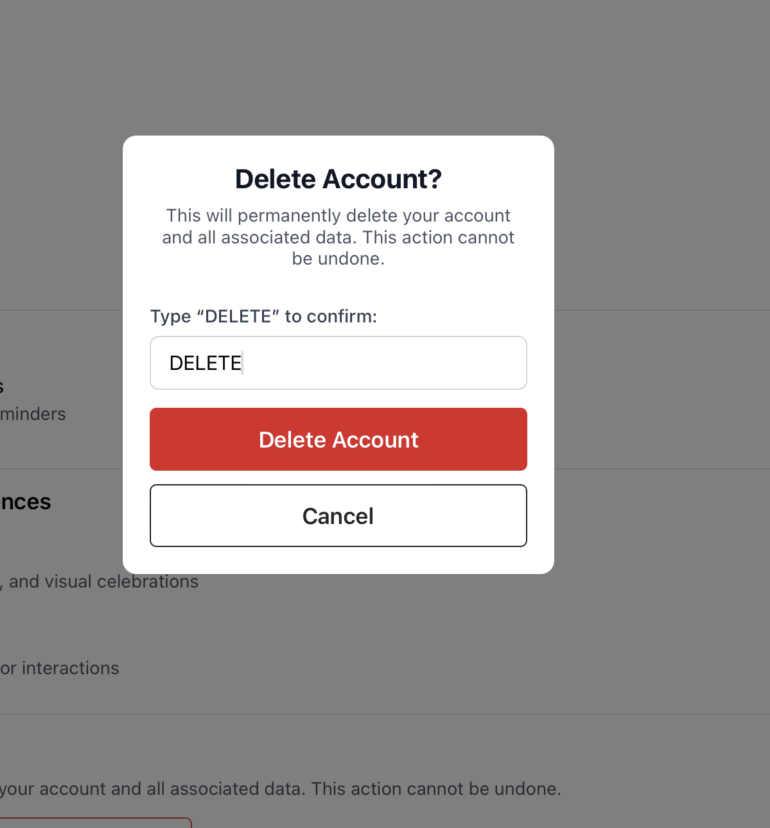
- Type DELETE to confirm and tap Delete Account again.
Example confirmation dialog:
Can't access the app?
Email us from the phone number or email associated with your account:
- Subject: Delete my account
- Include: your full name and the phone number you used to sign up
We may request additional verification for your security.
What we may keep temporarily
To meet legal, security, and reliability obligations, we may retain limited records (e.g., abuse prevention logs, payment or compliance records) and system backups for a short period. These are isolated and deleted on a rolling schedule.
Third-party services involved in deletion
We store data primarily in Supabase (US-East). We also use:
- PostHog (product analytics & session replay)
- Sentry (error & crash diagnostics)
- Twilio (phone verification / SMS delivery)
- Klaviyo (push/email/SMS messaging)
- OpenPhone (two-way texting)
When your account is deleted, we instruct these providers to delete or de-identify associated data consistent with their retention schedules.
FAQs
Can I restore my account after deletion?
No. Deletion is permanent. You can create a new account and start fresh.
What if I only want to stop notifications?
You can turn off push in iOS Settings or adjust SMS/email preferences in the app without deleting your account.
How long will messages and activity remain visible?
Once you confirm, access typically ends immediately. Background deletion completes within 90 days.
Need help?
Contact us any time at team@getsharp.app.
Sharp Test Prep, Inc. • 56 Broad Street, STE 14308, Boston, MA 02109 US • Privacy Policy